 Script programming Script programming
| This function block can be used to program your own scripts in high-level language. Lua (www.lua.org) is used as interpreter. In this description only the language extensions are discussed. |
Inputs |
||
| E1-x |
Input
1-x |
Inputs.
These can be addressed in the script via the global variables E1, E2,
etc. For a better overview, alias names can also be assigned to them. |
Outputs |
||
| A1-Ax |
Output 1-x |
Inputs. These can be addressed in the script via the global variables A1, A2, etc. For a better overview, alias names can also be assigned to them. |
Parameter |
||
| Number of inputs |
number of inputs |
|
| Number of outputs |
number of outputs | |
| Eventfilter |
By default, events or telegrams are only forwarded to the function block if the corresponding variables are connected at the inputs or outputs. By switching off this filter, all events are forwarded to the function block. Please note that the processing of all events takes considerably more processing time, the filter should therefore only be deactivated if absolutely necessary. | |
| Edit |
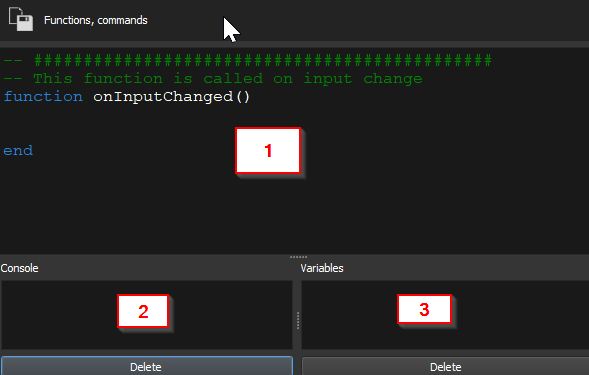
Click on this button to edit the script, alternatively you can also right-click on the function block. |
|
| onCreate() |
This
function is called once when the function block is initialized. For
example, you can define initializations of global variables here. |
| onInputChanged() |
This function is called if something has changed at the inputs. |
| onEvent(Value,Phys_Address,Group_Address,Command) | This
function is called when a telegram is received, for example a KNX
variable connected to the input. By default, only telegrams which are
connected to the inputs are passed on to the script, this can be
deactivated with the "Event filter" parameter. The following arguments are passed to the function:
Important: This function should only be used if it is really necessary to react to telegrams, for example KNX telegrams. If possible the function onInputChanged should be used. If onEvent is activated, the telegrams are forwarded to the interpreter, which results in a higher load on the controller. |
| onTimerEvent100ms() | This function is called once per 100 milliseconds. |
| onTimerEvent1s() |
This function is called once per second. |
| onTimerEvent1m() |
This function is called once per minute. The call is always made at the beginning of each minute. |
| onTimerEvent1h() |
This function is called once per hour. The call is always made at the beginning of each hour. |
| sys_write_value("0/0/0",value,force) |
Write any variable: The variable is only sent when the value has changed. This allows the function to be called cyclically.
|
| sys_get_value("0/0/0") |
Query the value of a variable
|
| sys_debug_print("Text: ",value) |
Output
of a text in the console. With each call a new line is sent to the
debug console, this can be used to check if a function has been called.
The function is given two arguments:
|
| sys_alias("E1","Wert_xy") |
With
this function a symbolic name can be assigned to an input or output.
These are then also displayed in the window for the links. Important: Aliases must be defined in the function "onCreate()". The alias names must not contain spaces, umlauts or special characters.
|
| sys_get_addr_in(1) | Returns the address of the linked variable of an input in the format "1/2/3", where 1 is E1 etc. |
| sys_get_addr_out(1) | Returns the address of the linked variable of an output in the format "1/2/3", where 1 is A1 etc. |
| sys_set_persistent_value("Name","Value") | With this function, any data can be stored in the persistent area of the controller. Important: The controller is equipped with a flash memory that cannot be written to as often as required. This function must therefore not be called too often. Continuous saving of persistent values shortens the lifetime of the flash memory and leads to a defect or loss of data. |
| sys_get_persistent_value("Name","DefaultValue") | With this function the persistent values can be read out again. |